This is the start of a new series, a step back from writing SQL queries to something that actually comes before any of that: designing the database itself. Every table I’ve been querying in my SQL series had to be designed before it could be created, and this post is me working through that process properly for the first time, starting from a vague business idea and ending with an actual ER diagram I built myself.
Why Do We Even Need Database Design?
It would be easy to just start creating tables as the need comes up. Database design exists to prevent three specific problems that show up later if you skip it:
- Data redundancy: the same information getting stored in multiple places, with no single source of truth
- Performance: poorly structured tables that make queries slow as data grows
- Maintenance: a database that becomes genuinely painful to update or extend later on
Modeling, in plain terms, is just an organized way of deciding how data should be stored before you store any of it.
The Three Layers of Data Modeling
Database design happens in three distinct stages, each one building on the last:
1. Conceptual layer (the business layer) This is just: what does the business actually want? It’s gathered directly from requirements, in plain language, with no technical detail yet.
2. Logical layer This is where the conceptual idea turns into structure, an Entity Relationship Diagram (ER Diagram). For example, a simple idea like “users place orders” becomes something like:
Users                    Orders
user_id     ──logic to──  o_id
user_email    connect →   o_amt
Still no actual database yet, just entities, their attributes, and how they relate.
3. Physical layer This is where the logical design finally becomes real. The logic from the ER diagram gets turned into actual SQL scripts, which get run against a real database engine:
logic ──create sql commands──► SQL ──► Postgres DB ──► actual tablesOnly at this final stage does anything resembling a real, queryable table exist.
Two Types of Modeling: OLTP vs. OLAP
Not all databases are designed for the same purpose, and this distinction shapes the entire design process.
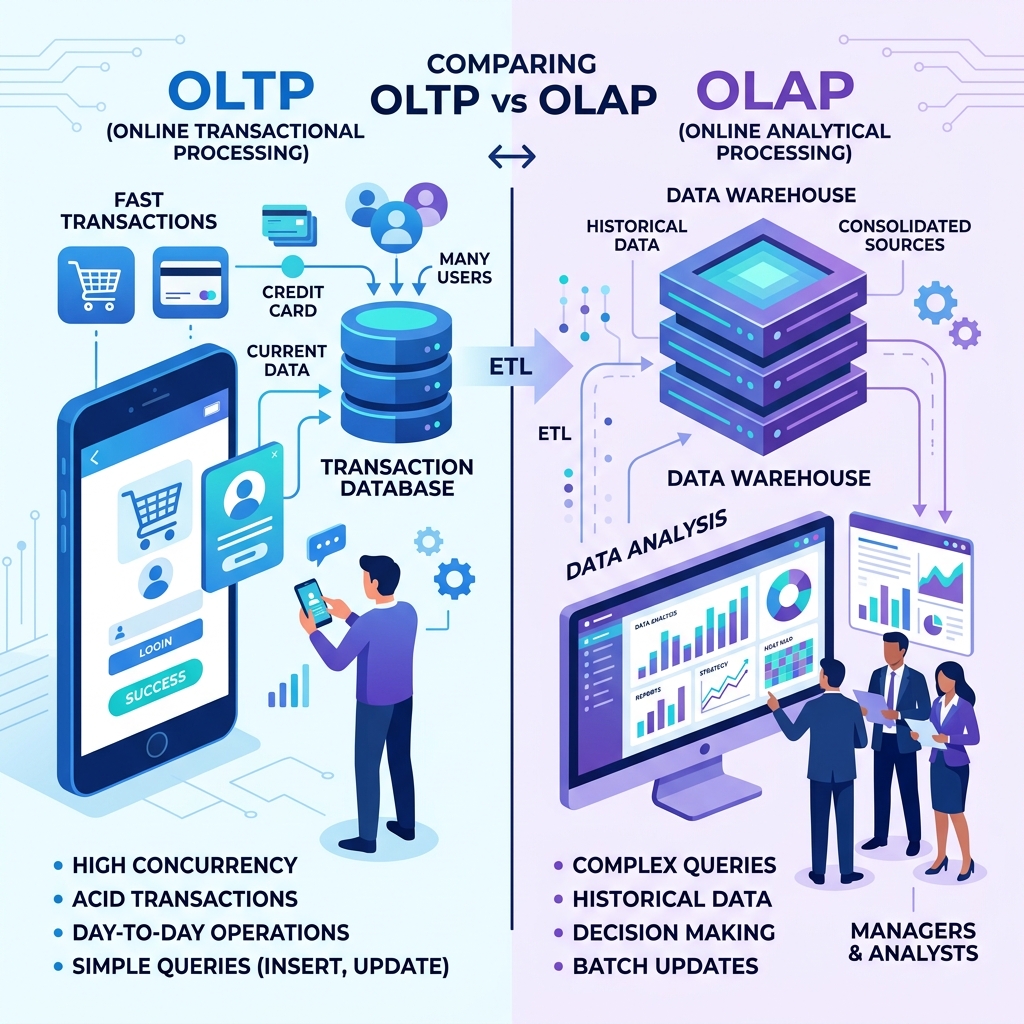
OLTP (Online Transactional Processing) is what most people picture when they think “database”, an app talking to a database on behalf of users:
- Involves individual transactions (placing an order, updating a profile)
- Needs to be fast and reliable
- Data changes frequently, often every second
- Speed matters more than anything else
OLAP (Online Analytical Processing) serves a completely different purpose, it’s for analyzing huge amounts of historical data, not running an app:
- Pulls data from an OLTP database as its source
- Deals with enormous data volumes
- Exists to build reports, not run live transactions
- Speed isn’t really the point, accuracy and completeness are
This matters a lot once you start designing, because a table structure optimized for fast transactions looks very different from one optimized for building reports across years of historical data.
Gathering Requirements Like a Real Developer
This was the part of the notes I found most practically useful, before touching any design tool, you actually have to go ask people what they need.
DB Developer (me) ──KPIs──► Business folk / SMEs / Team leads / DevelopersKPI here stands for Key Performance Indicator, the measurable goals that tell you what the business actually cares about.
When gathering requirements, there are three specific things to dig for in every conversation:
- Subject: the “thing” being described (e.g., Customers)
- Characteristic: a property or detail of that subject (e.g., customers have an email)
- Relation: how one subject connects to another (e.g., customers can place orders)
Two development approaches were mentioned for how this requirement-gathering actually flows:
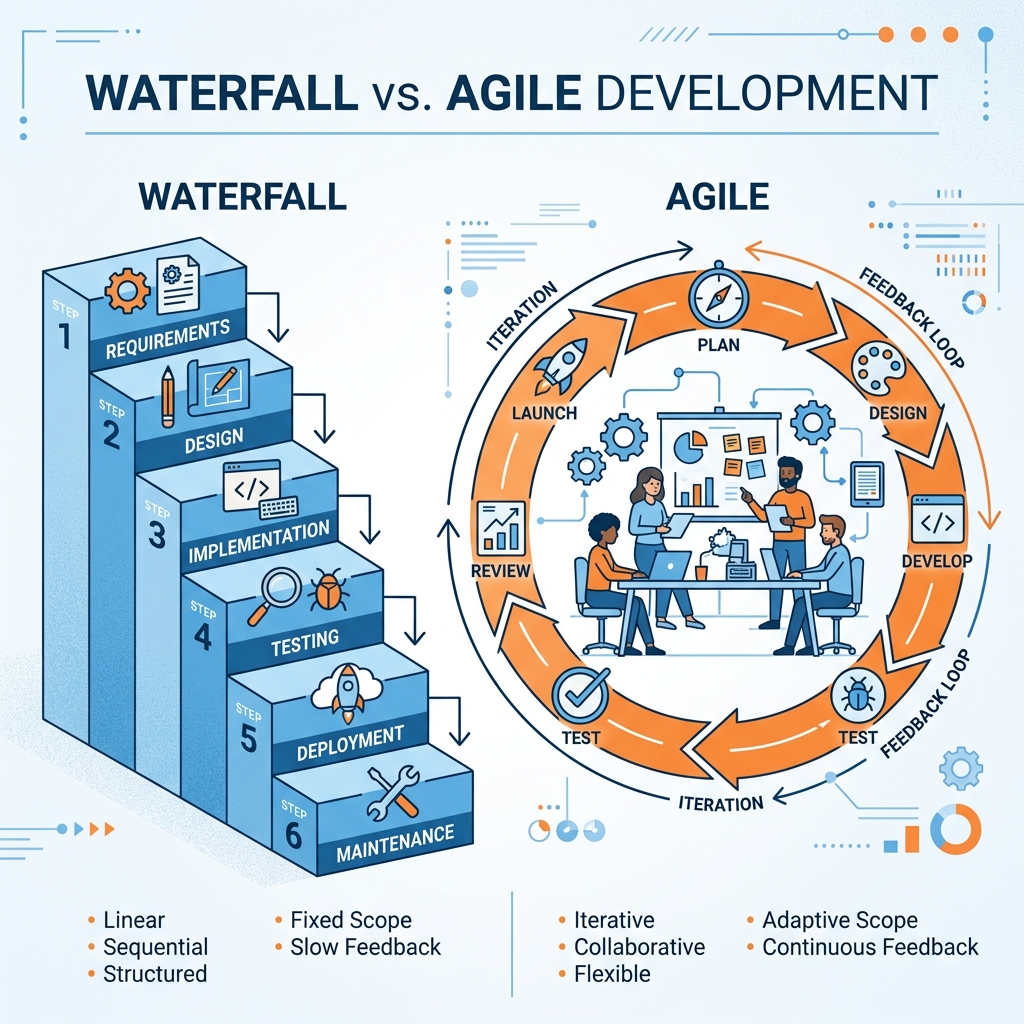
The difference is where the client sits in the process, Waterfall shows them the result at the very end, while Agile keeps checking back with them throughout, which catches misunderstandings far earlier.
Walking Through a Real Example
Here’s where the requirements actually turned into structure. Each requirement got broken down into its subject and characteristics, exactly the framework from above, applied for real.
Requirement 1: Customer Management “The system should store information about customers who purchase products from the company.”
Subject: Customers
Characteristics: C-ID, F-name, L-name, Email, Phone no., Date joined
Requirement 2: Product Catalog Management “The system should maintain a catalog of products available for sale.”
Subject: Product
Characteristics: product-id, product-name, category-id, price, stock-quantity
Requirement 3: Order Processing “The system should record orders placed by customers.”
Subject: Order
Characteristics: order-id, order-date, total-amount, qty

Relationship:
A customer can place many orders.
An order belongs to exactly one customer.
Requirement 4: Store Branch Management “The company operates multiple store branches that process customer orders.”
Subject: Store Branch
Characteristics: store-branch-id, store-branch-name, store-branch-location

Relationship:
A store branch can process many orders.
An order is processed by exactly one store branch.
Three more requirements followed the same pattern: payments, products, and shipment: each one becoming its own subject with its own characteristics, the same way the first four did.
Turning It Into the Logical Layer (ER Diagram)
Once every requirement had been broken into a subject and its characteristics, they came together into one combined picture, five entities, each with their own attributes:
customers        orders              payment         product          shipment
C-id (PK)         O-id (PK)          P-id (PK)        Pr-id (PK)        S-id (PK)
f-name            C-id (FK)          O-id (FK)        P-name            S-center
l-name            O-date             P-method         category-id      Tracking no.
email             total-amount       P-amount         price            shipment-status
phone-no          store-branch-id    P-status         stock-qty        Est. delivery date
date-joined       store-branch-name  transaction-
                  store-branch-      timestamp
                  location
This is the point where “requirements” officially became a diagram, built using draw.io, entity by entity, with lines drawn to represent how they connect.
Choosing Data Types
Every attribute in that table above eventually needs an actual data type once it becomes a real column. Here’s the breakdown from the notes:
Numeric types:
INT, BIGINT (for larger numbers), FLOAT, DOUBLE
NUMERIC(p, s) → p = total digits, s = digits after the decimal point

Example: 10.123456789 → NUMERIC(11, 9)
(11 total digits, 9 of them after the decimal point)
String types:
CHAR(n)      → fixed length
VARCHAR(n)   → variable length, saves memory over CHAR
TEXT         → for long, unstructured text
NVARCHAR     → like VARCHAR, but supports Unicode characters
Date and time types:
DATE       → 2026-10-05
TIME       → 11:01:55
TIMESTAMP  → 2026-10-05 11:01:55 (date and time combined)
Picking the right type isn’t just a formality, VARCHAR over CHAR saves real storage space, and NUMERIC(p, s) guarantees exact decimal precision, which matters a lot for anything involving money.
Keys, Revisited From the Design Side
I covered keys from the SQL side back in Part 1 of my SQL Basics series, but seeing them from a design perspective first actually makes the whole hierarchy click more clearly:
Superkey        → any combination of columns that can uniquely identify a row
 └── Candidate key → a superkey with no unnecessary extra columns, the minimum needed
      └── Primary key → the one candidate key actually chosen; unique and never null

Alternate key   → any candidate key that wasn't chosen as the primary key
Unique key      → must be unique, but (unlike a primary key) can allow a null
Foreign key     → the primary key of another table, used to link records together
Composite key   → used when no single column is unique on its own, so two or more combine to form the key
Picturing it as nested circles helps: every primary key is a candidate key, and every candidate key is a superkey, but the reverse isn’t true.
Relationships and Cardinality
This is about describing, precisely, how two entities relate to each other, not just that they relate, but exactly how many of one can connect to how many of the other.
Cardinality symbols (crow's foot notation):
Zero  → O
One   → |
Many  → <  (the "crow's foot")
Each connecting line has a min match and a max match on each end, describing the minimum and maximum number of matches allowed on that side.
A one-to-one / many-to-one example:
Orders >|─────|| Customers

Reading it:
Orders → Customer   = many-to-one (many orders can belong to one customer)
Customer → Orders    = one-to-one in the other direction, depending on how it's read
Resolving a many-to-many relationship:
A single order can include many different products, and a single product can appear across many different orders, that’s a classic many-to-many relationship, and relational databases can’t represent many-to-many directly between two tables. The fix is a bridge table (also called a junction or associative table) sitting in between:
Orders |───────|< Order_Items >|───────| ProductsThe bridge table, order_items here, just stores pairs of IDs, one row per order-product combination:
order_id | product_id
1        | 101
1        | 103
2        | 101
2        | 102
3        | 102
Order 1 appears twice because it contains two different products. Product 101 appears twice because it was ordered by two different orders. This simple pairing table is what actually makes a many-to-many relationship possible in a relational database.
From Design to Reality: The Actual ER Diagram I Built
This is the part that ties everything together, taking every requirement, entity, key, and relationship from above and turning it into one finished schema.
(This is the actual ER diagram showing the relationships between Customers, Orders, Products, and Payments. The order_items table resolves the many-to-many relationship.)
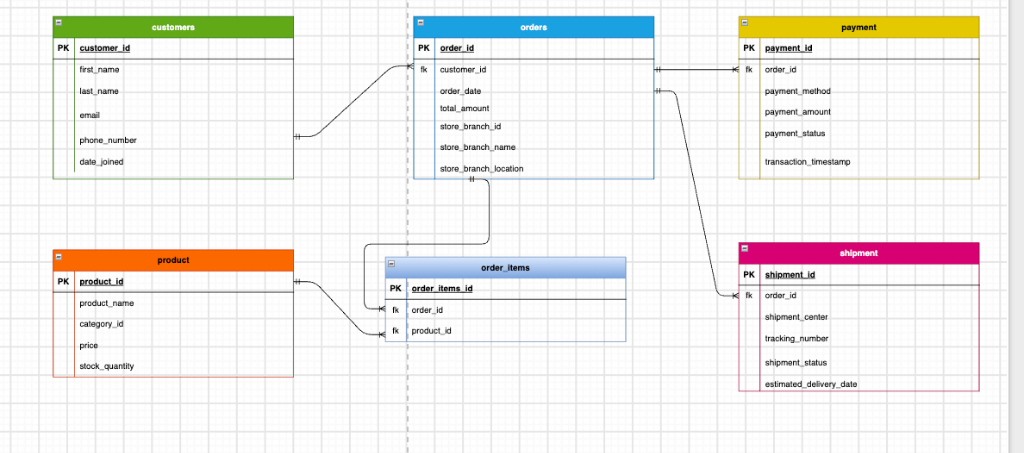
Here’s the final structure, table by table:
customers                orders                      payment
PK customer_id           PK order_id                 PK payment_id
   first_name            FK customer_id               FK order_id
   last_name                order_date                   payment_method
   email                     total_amount                  payment_amount
   phone_number              store_branch_id                 payment_status
   date_joined                store_branch_name                transaction_timestamp
                               store_branch_location

product                  order_items                 shipment
PK product_id            PK order_items_id           PK shipment_id
   product_name          FK order_id                  FK order_id
   category_id           FK product_id                   shipment_center
   price                                                    tracking_number
   stock_quantity                                              shipment_status
                                                                   estimated_delivery_date
Walking through how it connects, back to the actual requirements:
customers→orders: one customer can have many orders, exactly Requirement 3’s relationship, now expressed as a foreign key (customer_idinsideorders)orders→order_items←product: this is the many-to-many bridge in action,order_itemsholds bothorder_idandproduct_id, letting one order contain many products, and one product appear across many ordersorders→payment: each payment record links back to the order it belongs to, throughorder_idorders→shipment: each shipment also links back to its order, throughorder_id
Every single foreign key in this diagram traces directly back to a relationship I wrote down in plain English, back when I was just gathering requirements. That’s the whole point of going through the layers in order, conceptual, then logical, then physical, instead of jumping straight to writing CREATE TABLE statements and hoping for the best.
30-Second Quick Revision
The Big Idea: Database design happens in three steps: Conceptual (what business wants), Logical (ER diagram with entities and relationships), and Physical (actual SQL CREATE TABLE statements).
- OLTP vs OLAP:
- OLTP: Runs the live app, fast small transactions, normalized tables.
- OLAP: Runs reports and analytics, reads historical data, dimensional models.
- Key Hierarchy:
Superkey: Any combination of columns that can uniquely identify a row.Candidate Key: Minimal superkey (no extra useless columns).Primary Key: The chosen candidate key (unique, never null).Foreign Key: Points to a primary key in another table.
- Relationships:
- 1:1 (one-to-one), 1:N (one-to-many), N:M (many-to-many).
- Relational databases cannot do N:M directly: always resolve with a bridge / junction table (like
order_items).
- Common Mistakes:
- Jumping straight to writing
CREATE TABLEwithout figuring out relationships. - Storing duplicate text attributes instead of linking with foreign keys.
- Using
CHARinstead ofVARCHARor floating-point instead ofNUMERIC(p, s)for money.
- Jumping straight to writing
What’s Next
The next logical step after designing tables is normalization: making sure our schema doesn’t suffer from update, insert, or delete anomalies. That’s Part 2.
Seeing a foreign key in the final diagram and being able to trace it all the way back to a single sentence from the requirements, “an order belongs to exactly one customer”, was the moment database design stopped feeling abstract and started feeling like actual engineering.