In Part 1 I gathered requirements and drew a basic ER diagram. This part is about making sure that design is actually good, and then taking it into analytics.
What’s in these notes:
- Why normalization matters
- One messy table, normalized step by step (1NF, 2NF, 3NF, BCNF)
- Expanding my own e-commerce ER diagram
- OLAP: Medallion Architecture and a Star Schema
- Slowly Changing Dimensions (SCD)
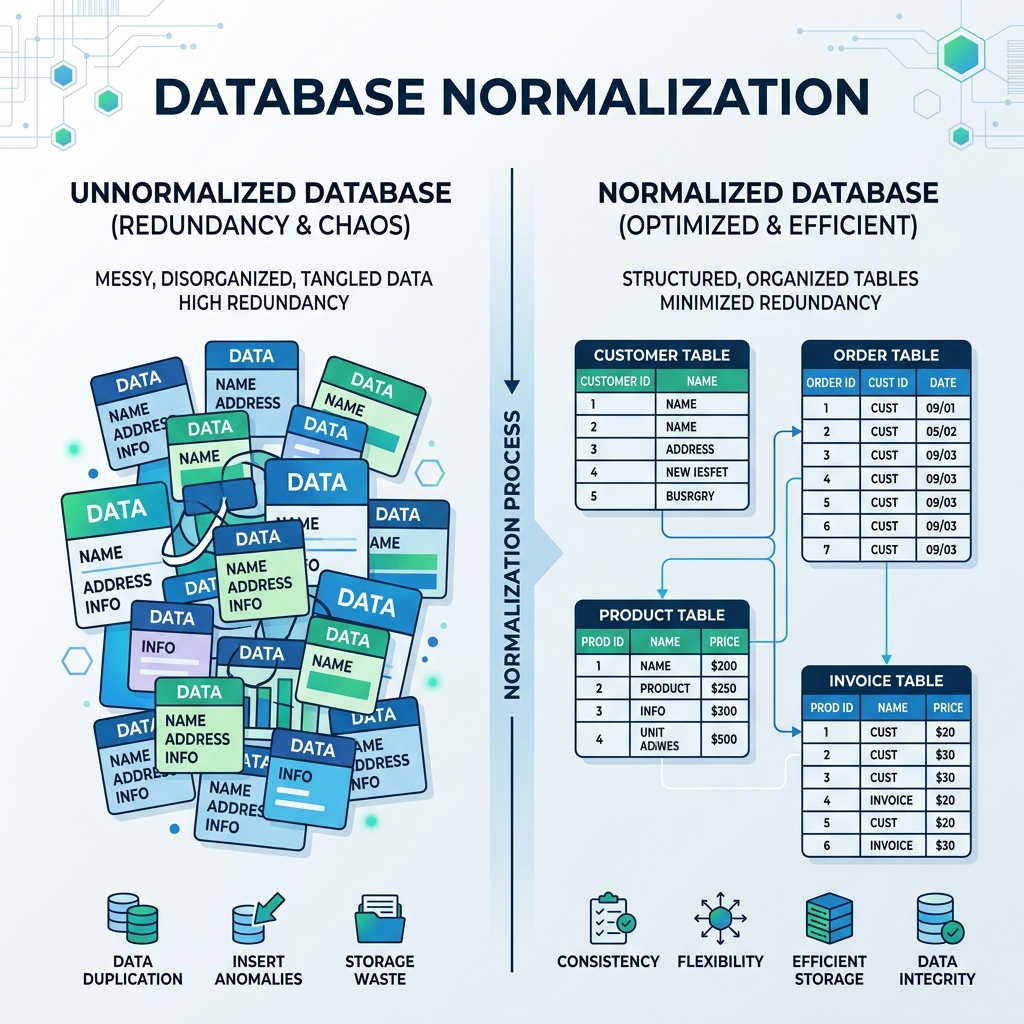
1. Why Normalization?
If data is thrown into tables without any structure, three things go wrong:
| Problem | What happens |
|---|---|
| Update anomaly | A customer changes city and I have to fix it in 50 order rows. Miss one and the data disagrees with itself. |
| Insert anomaly | I can’t save a new product until someone orders it. |
| Delete anomaly | Deleting a customer’s only order also deletes everything I knew about that customer. |
Normalization is a set of rules for splitting tables so each fact is stored in exactly one place.
2. One Table, Four Normal Forms
I used a single invoice table for the whole walkthrough so I could see the same data change shape at every step.
Starting point: unnormalized
| InvoiceID | CustID | CustName | CustCity | Items (ProdID, ProdName, Category, Qty) |
|---|---|---|---|---|
| 1001 | C1 | Alice | NY | (P1, Laptop, Electronics, 1), (P2, Mouse, Electronics, 2) |
| 1002 | C2 | Bob | LA | (P1, Laptop, Electronics, 1) |
The Items column holds a list inside one cell. I can’t count Laptop sales without parsing text.
Step 1: First Normal Form (1NF)
| Aspect | Detail |
|---|---|
| Rule | Every cell holds one value. No lists, no repeating groups. |
| Problem here | The Items column holds several products in one cell. |
| Fix | One row per product on an invoice. The primary key becomes InvoiceID + ProdID. |
Result: Raw table in 1NF
| InvoiceID (PK) | ProdID (PK) | CustID | CustName | CustCity | ProdName | Category | Qty |
|---|---|---|---|---|---|---|---|
| 1001 | P1 | C1 | Alice | NY | Laptop | Electronics | 1 |
| 1001 | P2 | C1 | Alice | NY | Mouse | Electronics | 2 |
| 1002 | P1 | C2 | Bob | LA | Laptop | Electronics | 1 |
Step 2: Second Normal Form (2NF)
| Aspect | Detail |
|---|---|
| Rule | Must be in 1NF, and every non-key column depends on the whole primary key, not just part of it. |
| Problem here | ProdName and Category depend only on ProdID. CustID, CustName and CustCity depend only on InvoiceID. Neither depends on both. These are partial dependencies. |
| Fix | Split into one table per thing: invoices, products, and the items on each invoice. |
Result: 3 tables in 2NF
Invoices
| InvoiceID (PK) | CustID | CustName | CustCity |
|---|---|---|---|
| 1001 | C1 | Alice | NY |
| 1002 | C2 | Bob | LA |
Products
| ProdID (PK) | ProdName | Category |
|---|---|---|
| P1 | Laptop | Electronics |
| P2 | Mouse | Electronics |
Invoice_Items
| InvoiceID (PK, FK) | ProdID (PK, FK) | Qty |
|---|---|---|
| 1001 | P1 | 1 |
| 1001 | P2 | 2 |
| 1002 | P1 | 1 |
Step 3: Third Normal Form (3NF)
| Aspect | Detail |
|---|---|
| Rule | Must be in 2NF, and no non-key column depends on another non-key column (no transitive dependencies). |
| Problem here | In Invoices, CustName and CustCity depend on CustID, and CustID is not the key. The chain is InvoiceID -> CustID -> CustName. |
| Fix | Move customer details into their own Customers table. |
Result: final 4 tables in 3NF
Customers
| CustID (PK) | CustName | CustCity |
|---|---|---|
| C1 | Alice | NY |
| C2 | Bob | LA |
Products
| ProdID (PK) | ProdName | Category |
|---|---|---|
| P1 | Laptop | Electronics |
| P2 | Mouse | Electronics |
Invoices
| InvoiceID (PK) | CustID (FK) |
|---|---|
| 1001 | C1 |
| 1002 | C2 |
Invoice_Items
| InvoiceID (PK, FK) | ProdID (PK, FK) | Qty |
|---|---|---|
| 1001 | P1 | 1 |
| 1001 | P2 | 2 |
| 1002 | P1 | 1 |
How the four tables connect:
Customers (1) ----< Invoices (1) ----< Invoice_Items >---- (1) Products
  CustID PK          InvoiceID PK        InvoiceID FK         ProdID PK
                     CustID FK           ProdID FK
Every column now depends on “the key, the whole key, and nothing but the key.” If Alice moves to Chicago, I change one row in Customers.
Step 4: BCNF (Boyce-Codd Normal Form)
BCNF is a stricter 3NF. The rule: for every dependency X -> Y, X must be a superkey.
The classic example is a school where each instructor teaches exactly one course:
| Student | Course | Instructor |
|---|---|---|
| John | DB | Smith |
| Mike | DB | Smith |
| John | OS | Brown |
Here Instructor -> Course, but Instructor is not a key of this table, so it breaks BCNF. The fix is to split it:
CourseInstructor
| Instructor (PK) | Course |
|---|---|
| Smith | DB |
| Brown | OS |
StudentInstructor
| Student (PK, FK) | Instructor (PK, FK) |
|---|---|
| John | Smith |
| Mike | Smith |
| John | Brown |
Most business schemas stop at 3NF. I’m noting BCNF so I recognize it when it shows up.
Quick comparison
| Form | Removes | One-line check |
|---|---|---|
| 1NF | Lists in a cell | One value per cell |
| 2NF | Partial dependencies | Depends on the whole key |
| 3NF | Transitive dependencies | Depends on nothing but the key |
| BCNF | Non-key determinants | Every determinant is a superkey |
3. Expanding My Own ER Diagram
After practicing on the invoice table, I went back to the draw.io e-commerce diagram from Part 1. It was too simple, so I rebuilt it in 3NF.
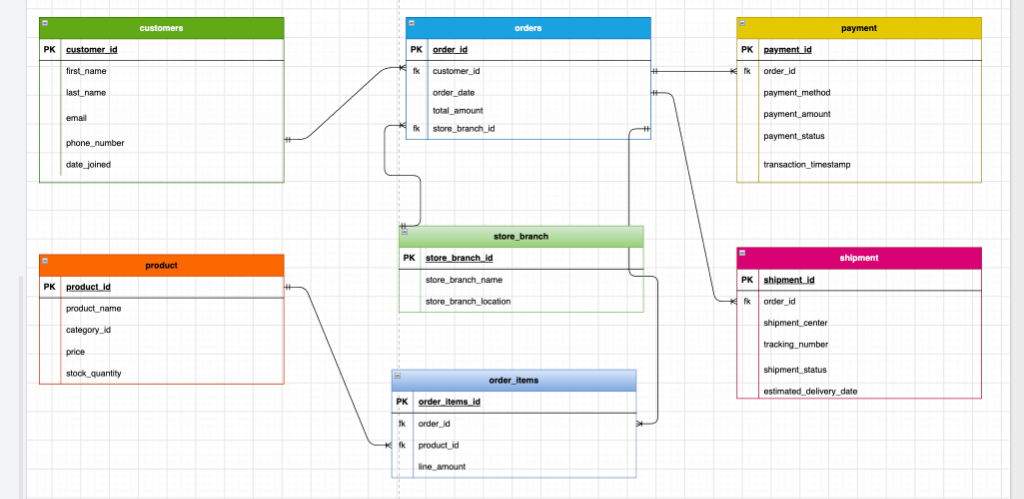
What changed and why:
| New table | Why I split it out |
|---|---|
payment |
Payment method, amount and status are their own facts, not part of an order row. |
shipment |
Tracking number, shipment center and delivery date would bloat orders. |
store_branch |
Branch name and location repeat for every order from that branch. |
order_items |
Bridge table for the many-to-many between orders and product. |
4. OLAP: Medallion Architecture
A 3NF database is great for running the app, but heavy reports across many joins are slow and can hurt the live system. For analytics I move the data into a lakehouse using the Medallion Architecture.
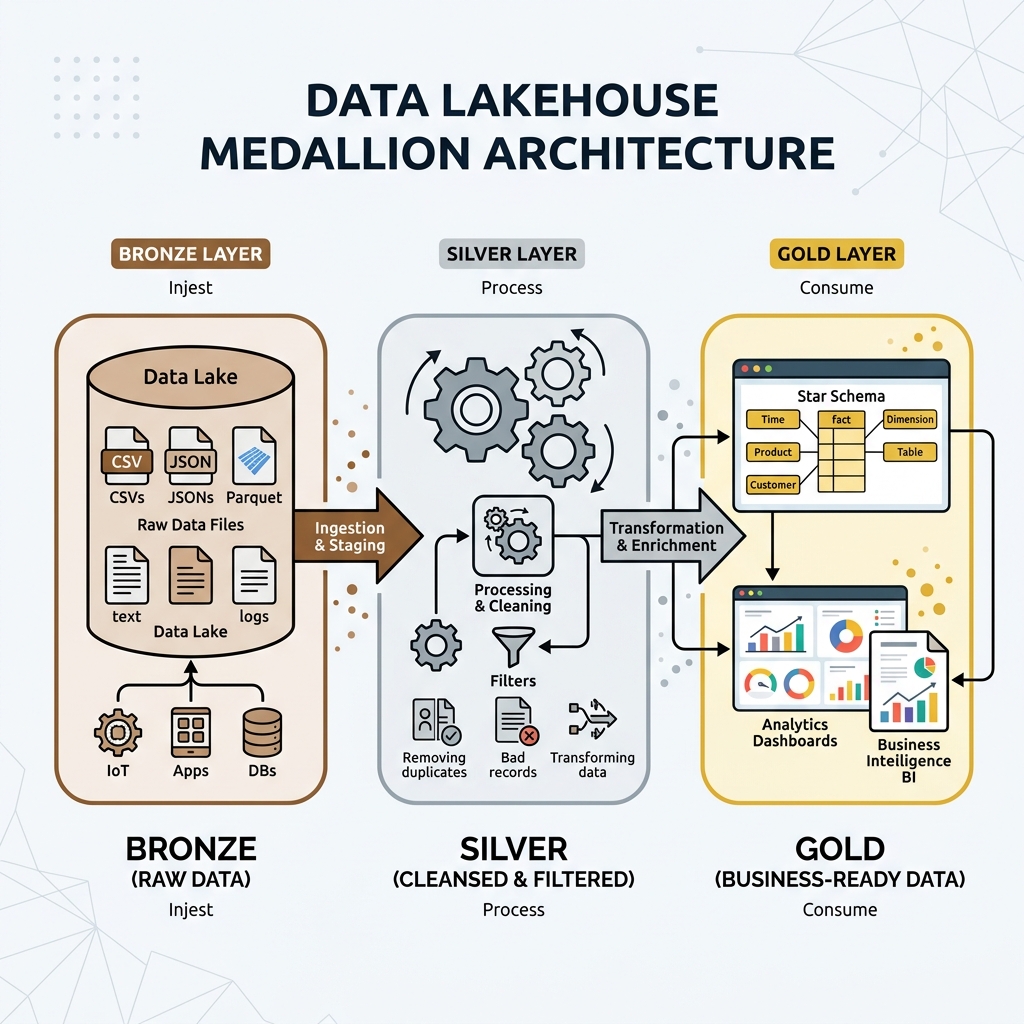
| Layer | What it holds | What it looks like for my e-commerce data |
|---|---|---|
| Bronze | Raw, untouched copy of the source | Exact copies of orders, payment, shipment, order_items, product, customers, store_branch |
| Silver | Cleaned and joined data | Nulls handled, duplicates removed, order_items joined with orders and product |
| Gold | Business-ready, aggregated | Star schema for dashboards |
Gold layer: Star Schema
Here is my ER diagram turned into a star schema with one fact table and four dimensions:
 +----------------+         +----------------+
 | dim_customer   |         | dim_date       |
 +----------------+         +----------------+
 | customer_key   |         | date_key       |
 | first_name     |         | full_date      |
 | last_name      |         | month          |
 | email          |         | year           |
 +-------+--------+         +-------+--------+
         |                          |
         +-----------+  +-----------+
                     |  |
              +------+--+------+
              |   fact_sales   |
              +----------------+
              | customer_key   |
              | date_key       |
              | product_key    |
              | store_key      |
              | total_amount   |
              | quantity       |
              +------+--+------+
                     |  |
         +-----------+  +-----------+
         |                          |
 +-------+--------+         +-------+--------+
 | dim_product    |         | dim_store      |
 +----------------+         +----------------+
 | product_key    |         | store_key      |
 | product_name   |         | branch_name    |
 | category_id    |         | branch_location|
 | price          |         +----------------+
+----------------+| Table | Type | Comes from |
|---|---|---|
fact_sales |
Fact | orders + order_items |
dim_customer |
Dimension | customers |
dim_product |
Dimension | product |
dim_store |
Dimension | store_branch |
dim_date |
Dimension | orders.order_date |
5. Slowly Changing Dimensions (SCD)
In the live database, a price change is just an UPDATE. In the warehouse, overwriting the old price would make last year’s sales reports recalculate with this year’s price. SCD is how dimensions keep their history.
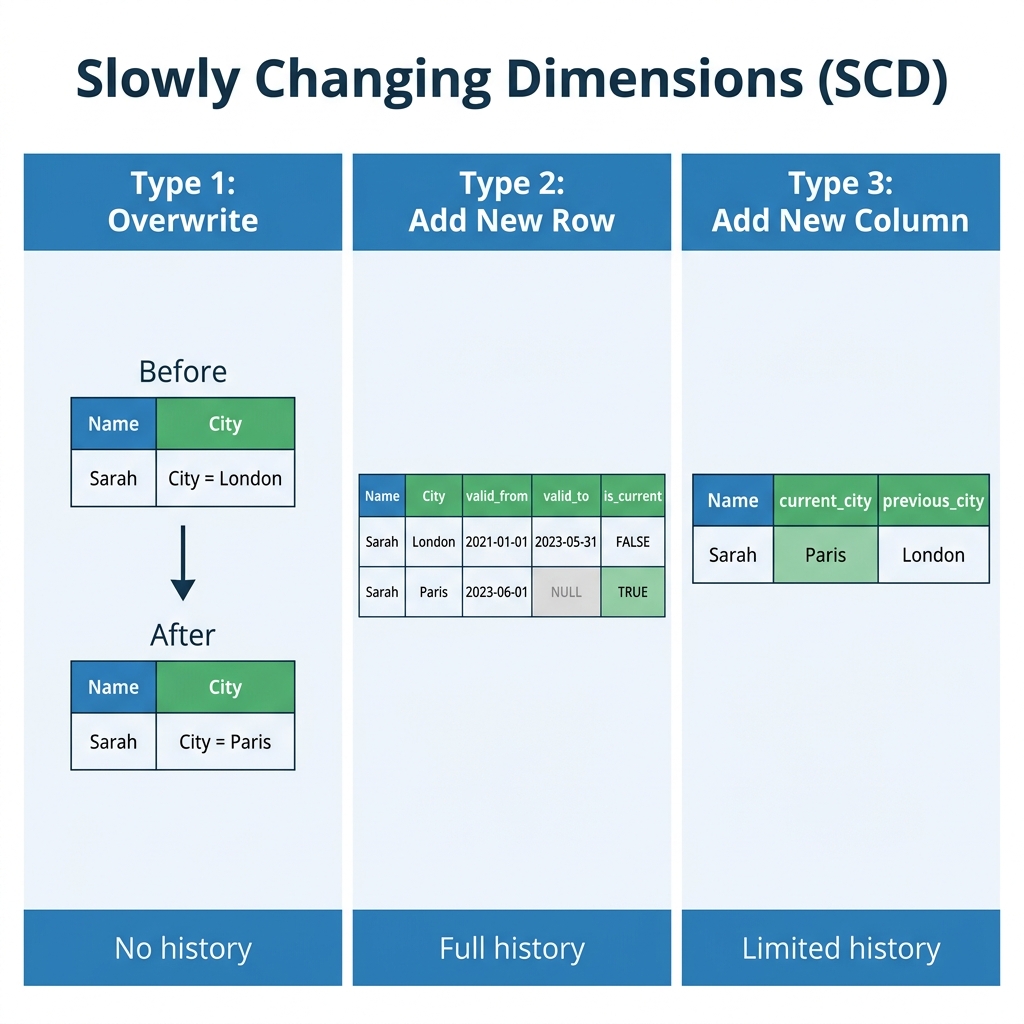
| Type | What it does | When I’d use it |
|---|---|---|
| SCD Type 1 | Overwrites the old value | Fixing a typo in a name. History doesn’t matter. |
| SCD Type 2 | Keeps the old row, adds a new row with dates | Price changes, address changes. History matters. |
| SCD Type 3 | Adds a column to hold the previous value | Only the last change matters, e.g. current_city and previous_city. |
Example for dim_product when P1 goes from $10 to $12 in October (SCD Type 2):
| product_key | product_id | price | valid_from | valid_to | is_current |
|---|---|---|---|---|---|
| 1 | P1 | 10 | 2026-01-01 | 2026-10-01 | FALSE |
| 2 | P1 | 12 | 2026-10-02 | NULL | TRUE |
Old sales keep pointing at product_key = 1 (the $10 row) and new sales point at product_key = 2. That’s why dimensions get a surrogate key instead of reusing product_id.
Example for dim_customer when a customer moves from London to Paris (SCD Type 3):
| customer_key | name | current_city | previous_city |
|---|---|---|---|
| 101 | Sarah | Paris | London |
Type 3 only remembers one previous value. If Sarah moves again, London is lost, so it’s only good when I care about “before and after” and not the full timeline.
30-Second Quick Revision
The Big Idea: Normalization removes data anomalies by making sure each fact is stored in exactly one place (“the key, the whole key, and nothing but the key”). For analytics, data is restructured into Star Schemas with SCD to preserve history.
- Normal Forms:
- 1NF: Atomic values. One value per cell, no lists or repeating groups.
- 2NF: In 1NF, and no partial dependencies (every non-key column depends on the full composite key).
- 3NF: In 2NF, and no transitive dependencies (no non-key column depends on another non-key column).
- BCNF: Every determinant must be a candidate key / superkey.
- Medallion Architecture (Lakehouse):
- Bronze: Raw ingested copies of source tables.
- Silver: Cleaned, deduplicated, joined data.
- Gold: Aggregated business-level Star Schema (
fact_salessurrounded bydim_customer,dim_product, etc.).
- Slowly Changing Dimensions (SCD):
- SCD Type 1: Overwrite the old value (no history kept, good for fixing typos).
- SCD Type 2: Insert a new row with date ranges and
is_currentflag (full history preserved, uses surrogate keys). - SCD Type 3: Add a
previous_valuecolumn (remembers only 1 previous state).
- Common Mistakes:
- Over-normalizing analytical databases (OLAP needs denormalized star schemas for fast aggregations).
- Overwriting historical data with SCD Type 1 when reports need historical accuracy.
- Reusing business primary keys directly in warehouse dimensions instead of creating surrogate keys.
What’s Next
Next up: writing PostgreSQL queries, understanding execution plans, and building pipelines to move data from OLTP into analytics.